


I don’t usually remember my dreams. And when I do, they’re stressful. A few weeks ago, I was exploring a dark and dangerous cave in my dreams. The cave floor was jagged, dirty, and oddly tenuous. It felt fragile in a way you don’t expect rock to be. Something was off with this cave. When I peaked over the edge of the floor, there was only darkness. Nothing as far as the eye could see. Until I squinted. Then I saw the faint outline of painful stalagmites below. I was just one untied shoelace away from a hundred foot fall and an impaled torso.
As I stepped away from the edge, I heard rocks shuffling. Cracking in the distance. I turned around to see the cave floor collapsing behind me. I was caught off guard. The cracks were catching up to my feet! I ran as fast as I could, but every step I took made the floor collapse faster. My explorer’s backpack weighed me down, so I quickly shed it. All my survival gear tumbled toward the spikes below.
The rocks crumbled beneath me. There was nothing to grab onto. Pebbles and boulders flew past me as I was swallowed by the dark depths of the cave!
And then, I was on my computer. Not my current Mac, mind you. My old Performa 575 in my teen bedroom, though I was an adult. The cave was all a game. An old shareware style computer game. A top-down, turn-based game that played like the original Rogue, where every arrow key press jumped me one square on an invisible grid. I was having a good time, very much not impaled, navigating to a flag on the opposite side of the screen while attempting to outrun a collapsing floor.
And then, I woke up. The first thing I thought was, “I should make that cave game.”
After work, I had a little time before dinner. So I conducted an experiment. Could I prototype this cave game before dinner? I opened GDevelop and got to work. I started by making a few art assets I knew I’d need. A derpy little player character with purple hair. The hero of an unshipped Atari game. I made three types of cave floors: Solid, Cracking, and Crumbled. Finally, a classic red flag on gold pole. The kind of flag we’re all reaching for in real life.
I setup the scene as a grid with 64 pixel squares and made all the art assets on 64 pixel canvases, so all the objects would fit perfectly on the map. I set my workstation to snap-to-grid and built my test level. This would be incredibly simple. Imagine a cross shape flipped 90 degrees clockwise. On the left end was the player. On the right end was the flag. When the player hit an invisible trigger point midway through the path, the top and bottom sides of the cross would begin collapsing. If the player kept up pace toward the flag, they would reach the other side. If for some reason they took a step or two backwards before racing to the flag, the crumbling would infect the main path and the player would fall.
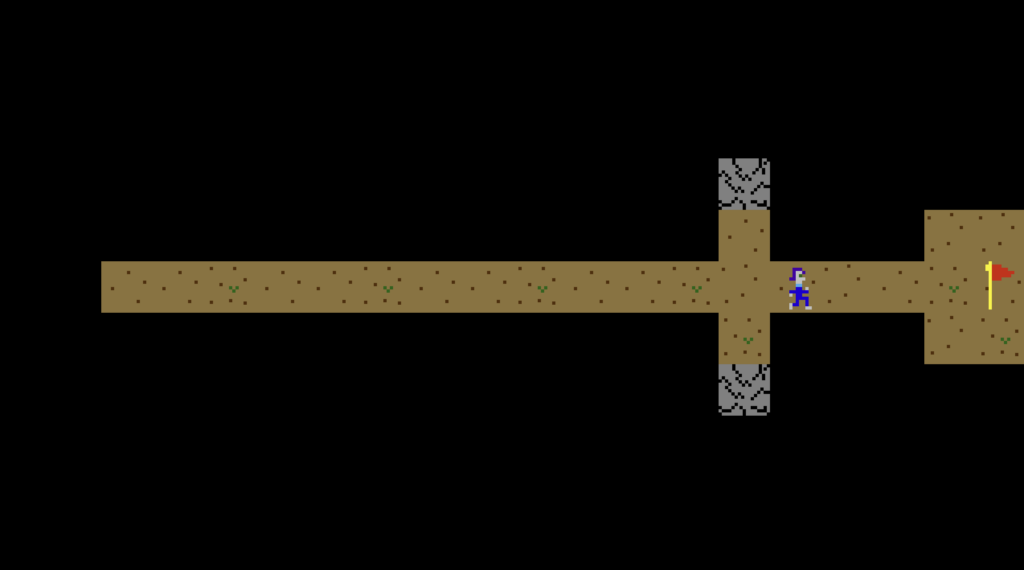
Most of the logic was straightforward to write. If the player presses an arrow key, go 64 pixels in that direction. If the player moves onto a black space (where there’s no cave floor), change the character image to “falling,” stop them from moving and put up the “lose” text (“you died oh no”). If the player reaches the flag, stop them from moving and put up the “win” text (“you did it right woo”). Setting up the map and movement logic in Unity would’ve taken me a whole session to get working right. At least. Not the case with GDevelop. I believe I spent a total of five minutes (I couldn’t believe it either) to get the character to move the way I expected.
The trickiest part was getting the crumbling to spread from tile to tile. As I learned on my last GDevelop project, the logic for “Same Type of Object to Same Type of Object” code is strange, because the engine won’t be sure which of the identical objects you’re talking about. But having learned that you can create invisible objects to act as intermediaries for stuff like collisions, I did exactly that. If a square of cave floor was solid, and wasn’t tagged as being a starting point for crumbling, then it would have an invisible shield on top of it. If a square of cave floor was next to a crumbling floor, it would kill the solid floor’s shield. I made it so any floor without a shield would crumble more whenever a player moved. The logic was sound. I had to fiddle with the amount of crumbling that took place in a single turn, but I got it to a place I liked.
The experiment was a success! It took me two hours to complete a functioning prototype, which included drawing all the art assets and programming. After all the headaches and frustration developing in Unity brought me over the years, this was extraordinarily empowering. Four months for a working prototype? Frustrating. Two hours? I can spare two hours, lol. Granted, I still find game programming to be a real challenge. It requires a good deal of problem solving and math, even in a “no code” engine. (There is still code, it’s just mercifully phrased in English.) But I can’t fully express how invigorating it was to go from nothing to my literal “dream” game in just two hours.
The project, which I ended up naming Cave Problems, has stalled. Not because of programming headaches. Playtesting made me realize that a game in which you outrun death is better suited for the action / arcade treatment than a turn-by-turn puzzle treatment. That was clear the moment Amanda began smashing the arrow keys, as opposed to considering each movement carefully as I intended. Also, another game project took Cave Problems’ spot in my limited time for outside projects. You’ll read about the new game in future newsletters.
Cave Problems served its purpose. I have more confidence in my ability to make game prototypes now. Rather than fall into the dark pit of despair over not knowing a programming language, I’ve got a rope and I know how to climb.
🎲 Your Turn: Have your dreams ever inspired a creative project? Do you remember a moment when you became more confident in your ability to create? Also, I bought an iBook G3 specifically to play 80s and 90s Mac shareware games. Got any recommendations? I’d love to hear from you! Reply directly to this email or hit the orange button below to leave a comment.
3 responses to “My Dream Game”
If I get around to making something worth sharing, I’ll try to remember to link it in a comment on a future post here.
Honestly, you’d think turn-based strategy games would be easy to make accessible, especially ones where everything is a glorified menu with a cursor that moves in discreet clicks(free roaming cursors, especially ones with variable speed, different sizes of interaction area, and no audible indication you’ve crossed a boundary can be brick walls in otherwise playable games), but the reality is that, when the blind do play such games, it’s usually via a lot of menu memorization, OCRing the screen(Which can be a hassle if you need to use a camera on the OCRing device to read the screen on the gaming device or in-game fonts don’t OCR well… fortunately highly readable fonts for the visually impaired, dyslexic, etc. are easier to implement and don’t require potentially rethinking game design from the ground up the way blind accessibility sometimes does, so are more common, though it still wouldn’t surprise me if an optimal OCR font is different from an optimal low-vision or optimal dyslexic font and OCR is still kind of a cludge even under optimal circumstances), and tons of patience… still a better situation than most action games though.
Honestly, I kind of want to play a text-only, turned based version of Cave problems… granted, making action games blind accessible tends to run into a bandwidth issue(even if most of any given game’s visuals are functionally just window dressing, there’s a lot of data about game state that can be communicated in the changes from one frame to the next over a second worth of frames that is hard to squeeze into a second’s worth of audio… not that there aren’t blind players that enjoy action-oriented games(fighting games are actually quite popular among the blind, at least your classic Arcade-style fighters where two fighters face each other across a mostly flat arena where the backdrop is window dressing, fighting games where you have to worry about Ring outs or the terrain offer more of an accessibility hurdle), but turn-based gameplay where I can take my time parsing the game state is more my speed, especially since I have slow ears(Normal human speech rate is around 150-180 words per minute, which is a common default for screen readers. I struggle to keep up if I try increasing rate, but some blind folk can crank their screen readers up to like 500 wpm or even 800, to the point it sounds like total gibberish to anyone with untrained ears. Think reading aloud versus normal silent reading versus speed reading, but my ears are stuck on reading aloud speed while some blind folk can speed listen on par with speed readers.
kind of want to fire up my text editor and try my hand at coding some kind of grid-based random puzzle generator… The logic for the grid and printing it to screen should be easy enough, the hard bit will be figuring out logic for how tiles change from one turn to the next and figuring out a labeling scheme for quickly parsing the board…
I’m glad my Cave Problems inspired you! Like you, I also gravitate towards games where I can take my time and think about the game state. Not that I don’t play fast paced action games (fascinating about fighting games being popular among the blind!), but the games that tend to give me the most joy are turn-based strategy. I’m not sure how accessible it is, but Die in the Dungeon is a new turn-based, grid-based strategy game I really enjoyed.
When you make your game, please post it here!